I’m trying to figure out the intended workflow for environment assets with nested props, and whether I should be using JSON or .ma files for layout loading. I suspect this is a fairly common scenario, so I’d love to hear how others handle it.
My Setup:
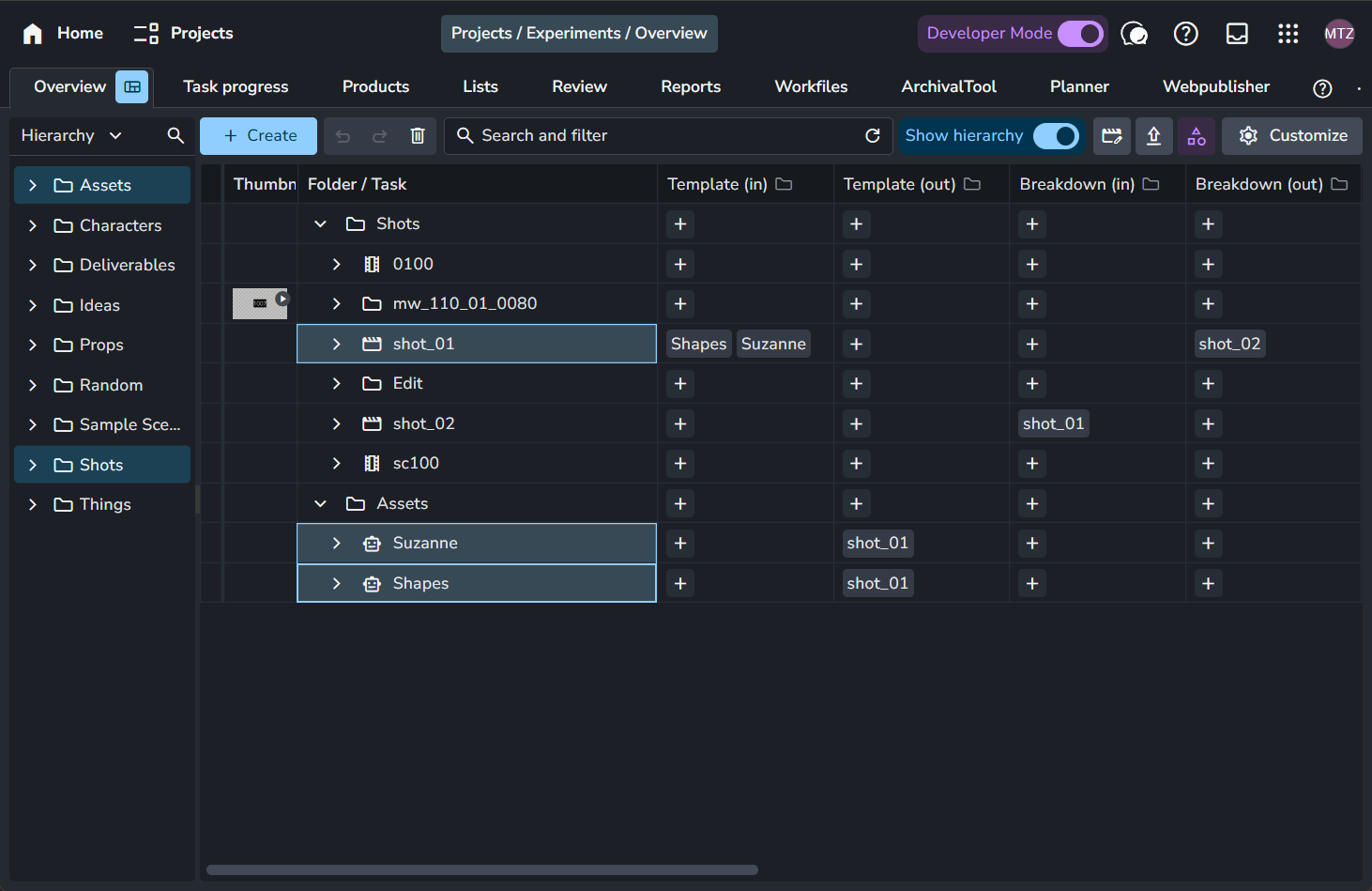
I have Environments declared as Assets in my project structure:
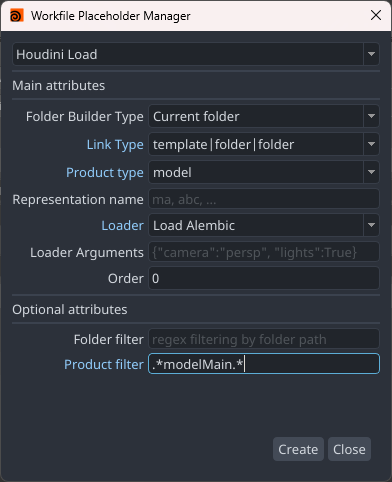
My Workfile Template for set_layouts automatically loads all linked assets into a Maya group using:
Placeholder: Linked folders
Product type: model
Representation: abc
Loader: Reference
Product filter:.*model.*
This works perfectly! (Though I’d love to be able to load entire folders instead of individual assets - I described that in this thread.
I publish this Environment Asset as Product type: Layout
This creates both a .ma file and a .json file with transform data
The Problem:
When I load the layout as a .ma reference, it works fine. But I’m getting errors when trying to load the .json representation:
During load error happened on Product: "layoutMain" Representation: "json" Version: 18
Error message: Syntax error: unexpected end | at position 26 while parsing:
    detergent_modelProxy_02_:|assets|assets_placeholder
                             ^
: detergent_modelProxy_02_:|assets|assets_placeholder

Traceback (most recent call last):
  File "/home/daniel/.local/share/AYON/addons/maya_0.5.1/ayon_maya/plugins/load/load_layout.py", line 243, in set_transformation
    obj_transforms = cmds.ls(
                     ^^^^^^^^
RuntimeError: Syntax error: unexpected end | at position 26 while parsing:
    detergent_modelProxy_02_:|assets|assets_placeholder
It seems like there are remnants of my template placeholder in the scene after conversion, causing this error. Is this a bug, or am I misunderstanding the workflow?
My Shot Setup:
For my Shots, I’ve linked the Garage environment. In my Shot Workfile Template, I’m trying to load the JSON:
Placeholder: Linked folders
Product type: layout
Loader: Load Layout
My Questions:
Is the JSON workflow intended for this use case? I thought layouts could consist of just JSON files with transform data, but maybe I’m wrong?
Should I just always reference the .ma file instead? What’s the purpose of the JSON file if not for this?
How do others typically solve the Environment/Props → Shot loading workflow?
Is the namespace error related to placeholder conversion a known issue? It looks like |assets|assets_placeholder is somehow still present in the scene data after the template build.
Any insights would be greatly appreciated! Thanks!
I wrote a cleanup script that removes the assets_placeholder node after the workfile template builds, then creates a fresh |assets group with all props reparented cleanly. This fixes the JSON loading error.
However, I’m still unsure if this is the “correct” workflow… Am I missing something about how the JSON layout workflow is intended to be used?
import maya.cmds as cmds

def cleanup_and_regroup_assets():
    """
    Removes placeholder groups, reparents assets to world temporarily,
    then regroups them in a clean new 'assets' group.
    """

    print("="*60)
    print("CLEANING UP PLACEHOLDER HIERARCHY")
    print("="*60)

    # 1. Find all referenced asset groups under |assets
    assets_group = '|assets'

    if not cmds.objExists(assets_group):
        print("No |assets group found. Scene might already be clean.")
        return

    # Get all children of |assets
    children = cmds.listRelatives(assets_group, children=True, fullPath=True) or []

    print(f"\nFound {len(children)} children under |assets:")
    for child in children:
        print(f"   - {child}")

    # 2. Separate placeholder nodes from actual asset groups
    placeholder_nodes = []
    asset_groups = []

    for child in children:
        short_name = child.split('|')[-1]
        if 'placeholder' in short_name.lower():
            placeholder_nodes.append(child)
        else:
            asset_groups.append(child)

    print(f"\n✓ Identified {len(asset_groups)} asset groups to preserve")
    print(f"✓ Identified {len(placeholder_nodes)} placeholder nodes to delete")

    # 3. Store short names of asset groups before reparenting
    asset_short_names = []
    for asset_group in asset_groups:
        short_name = asset_group.split('|')[-1]
        asset_short_names.append(short_name)

    # 4. Reparent all asset groups to world temporarily
    reparented = 0
    for asset_group in asset_groups:
        try:
            short_name = asset_group.split('|')[-1]
            print(f"\n   Reparenting to world: {short_name}")

            # Parent to world (None)
            cmds.parent(asset_group, world=True)
            reparented += 1

        except Exception as e:
            print(f"   ✗ Could not reparent {asset_group}: {e}")

    # 5. Delete placeholder nodes
    deleted = 0
    for placeholder in placeholder_nodes:
        try:
            short_name = placeholder.split('|')[-1]
            print(f"\n   Deleting placeholder: {short_name}")
            cmds.delete(placeholder)
            deleted += 1
        except Exception as e:
            print(f"   ✗ Could not delete {placeholder}: {e}")

    # 6. Delete the old |assets group
    try:
        if cmds.objExists(assets_group):
            print(f"\n   Deleting old |assets group")
            cmds.delete(assets_group)
            print("   ✓ Old |assets group removed")
    except Exception as e:
        print(f"   ✗ Could not delete |assets group: {e}")

    # 7. Create a NEW clean 'assets' group
    print(f"\n   Creating new clean 'assets' group")
    new_assets_group = cmds.group(empty=True, name='assets', world=True)
    print(f"   ✓ Created: {new_assets_group}")

    # 8. Parent all asset groups into the new clean group
    regrouped = 0
    for short_name in asset_short_names:
        try:
            # The asset is now at world level with just its short name
            if cmds.objExists(short_name):
                print(f"\n   Grouping into new assets: {short_name}")
                cmds.parent(short_name, new_assets_group)
                regrouped += 1
            else:
                print(f"   ⚠ Could not find {short_name} at world level")
        except Exception as e:
            print(f"   ✗ Could not regroup {short_name}: {e}")

    print("\n" + "="*60)
    print("CLEANUP COMPLETE!")
    print(f"  ✓ Reparented {reparented} asset groups")
    print(f"  ✓ Deleted {deleted} placeholder nodes")
    print(f"  ✓ Regrouped {regrouped} assets into new clean 'assets' group")
    print("="*60)
    print("\n⚠ IMPORTANT: Save your scene before publishing!")
    print("="*60)


def verify_scene_hierarchy():
    """
    Verify the scene hierarchy after cleanup.
    """

    print("\n" + "="*60)
    print("VERIFYING SCENE HIERARCHY")
    print("="*60)

    # Check that we have a clean |assets group
    if cmds.objExists('|assets'):
        print("\n✓ Clean |assets group exists")

        children = cmds.listRelatives('|assets', children=True, fullPath=True) or []
        print(f"\n✓ Assets in group ({len(children)}):")
        for child in children:
            short_name = child.split('|')[-1]
            print(f"   - {short_name}")

        # Check for problematic patterns
        problem_children = [c for c in children if 'placeholder' in c.lower()]
        if problem_children:
            print(f"\n⚠ WARNING: Still found placeholder nodes:")
            for node in problem_children:
                print(f"   - {node}")
        else:
            print("\n✓ No placeholder nodes found - hierarchy is clean!")
    else:
        print("\n⚠ No |assets group found")

    print("="*60)


# Main execution
def cleanup_and_verify():
    """
    Run complete cleanup and verification.
    """
    cleanup_and_regroup_assets()
    verify_scene_hierarchy()


# Run it!
if __name__ == '__main__':
    cleanup_and_verify()
For building environments, I’d say you may would like to check AYON USD ContributionWorkflow. It’s very handy in this situations. also, imo, it’s much easier to use than the native usd workflow in Maya.
@danielvw Hi, in essence use .ma layout not .JSON one. Also note you can use placeholder set to all folders as context and use folder filter and product name filtering to load all models from nested folders (e.g. setting your folder filter to Environments/Garage/Assets/ and product name to e.g. .*modelMain.*
The difference or usage of JSON layout repre is mostly when working with UE so you can reproduce the layout transforms etc. easily while loading it into UE Editor.
Hope this helps! Cheers!
P.S. It seems you have found a limitation/bug while using JSON layout product together with Template Builder imho.
Using the .ma layout works perfectly now. And the hardcoded folder filter approach (Environments/Garage/Assets/ with .*modelMain.*) is a great workaround — that’s exactly what I needed.
For the future, it would be nice if the Linked folders builder type could work dynamically per environment — so I could just link different asset folders to different environments and have the template automatically pick them up via Template links. But for now, the hardcoded filter solution works well enough for my project.
Yes, I know how to create links manually — that part works fine. But my point is slightly different:
As @libor.batek suggested – the folder filter in the Workfile Template placeholder I use is now hardcoded (e.g. Environments/Garage/Assets/). This means if I have multiple environments (Garage, Kitchen, Bedroom…), I’d need a separate template for each one.
I’d like a way to link an entire asset folder (like Environments/Garage/Assets/) to a shot, rather than having to select each asset individually. Then the template could dynamically load all assets from that linked folder.
Ideally something like a dynamic folder filter: {folder[path]}/Assets/
So when I’m working on a shot linked to Garage, it automatically loads from Environments/Garage/Assets/, and when linked to Kitchen, it loads from Environments/Kitchen/Assets/ — all with the same template.
Right now the “Linked folders” builder type doesn’t seem to support this kind of dynamic path resolution. But as I said, the hardcoded approach works fine for my current project since I only have three environments…
Edit: An alternative would be to enable bulk editing for Linked Folders in the web GUI — that would make it quicker to link multiple assets at once, even if it’s not fully automatic.
Quick workaround script (run after Build from Template) if somebody else is trying something similar:
import maya.cmds as cmds
import ayon_api
from ayon_core.pipeline import get_current_project_name, get_current_folder_path

def update_asset_placeholder():
    """
    Dynamically updates the folder_path attribute of the assets_placeholder
    based on linked environments.
    """

    project_name = get_current_project_name()
    current_folder = get_current_folder_path()

    # Get folder entity to get its ID
    folder_entity = ayon_api.get_folder_by_path(project_name, current_folder)
    if not folder_entity:
        print(f"Could not find folder: {current_folder}")
        return

    folder_id = folder_entity["id"]

    # Get linked entities
    links = ayon_api.get_entities_links(
        project_name,
        entity_type="folder",
        entity_ids=[folder_id],
        link_types=["template"]  # Template links
    )

    # Find environment link
    env_path = None
    for link_list in links.values():
        for link in link_list:
            linked_folder = ayon_api.get_folder_by_id(project_name, link["entityId"])
            if linked_folder and linked_folder["path"].startswith("/Environments/"):
                env_path = linked_folder["path"].lstrip("/")
                break

    if env_path and cmds.objExists("assets_placeholder"):
        dynamic_path = f"{env_path}"
        cmds.setAttr("assets_placeholder.folder_path", dynamic_path, type="string")
        print(f"✓ Updated folder_path to: {dynamic_path}")
    else:
        print("No environment linked or placeholder not found")

update_asset_placeholder()
I think it’d be cool to be able to link any intermediate folder and the system should parse the child entities. e.g. Assets folder, and the system find each Asset below it.