Workfile publish synchronise breaks for multiple submissions

Hi,

We were looking to follow this guide and turn on workfile version syncing

But it looks like it only works if you only make one publish at a time on a shot. If you publish multiple versions in parallel, it seems to take the version of the latest publish and applies it to the first one about to publish.
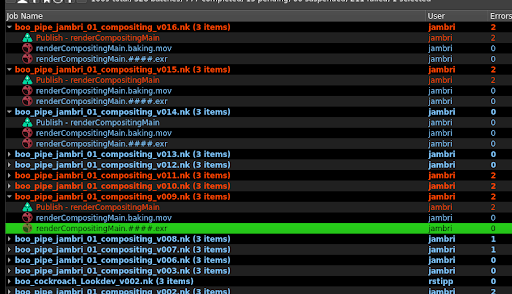
Here, versions 12, and 13 were dispatched separately, 12 finished publishing, then 13 was submitted. This worked ok, and version 12 workfile resulted in version 12 publish, and 13 to 13.

However, 14, 15, and 16, were dispatched one straight after the other, and as 14 goes to publish, it publishes as 16 instead. 15 and 16 then fail to publish because their version is already below or at the same as 16.

ayon_core.pipeline.publish.publish_plugins.PublishValidationError: Version ‘16’ from instance ‘renderCompositingMain’ that you are trying to publish is lower or equal to an existing version in the database. Version in database: ‘16’.Please version up your workfile to a higher version number than: ‘16’.

I think this is a bug? It doesn’t look like it does a live lookup of the workfile per job, each job has its workfile information in the deadline job parameters
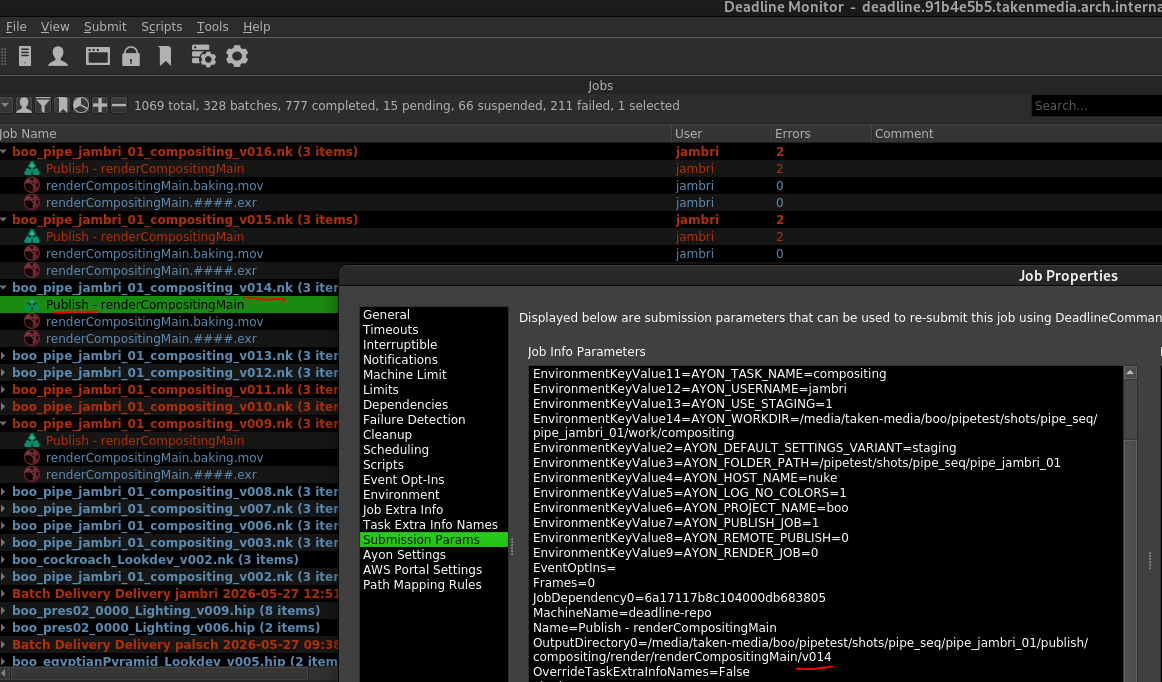
But it seems like as soon as 16 goes on the farm it must be setting a version somewhere that the publish jobs lookup outside of the submission parameters.

Can this be updated to pull the version from somewhere more reliable for multiple dispatches, this is often needed for people to test a few changing values, without having to wait on each one to complete in turn.
This is seems the same as Force publish lower version number

It looks similar yes. I’ve found multi version submission breaks whether you have the workfile version sync on or not, you just can’t submit multiple versions of the same thing.

Without the sync, we had 3 submissions of the same thing with some parameter tweaks, not enough to justify a full variant change, variant changes are for different lighting passes in this case, not what’s in the pass. Each version had 2 passes. Each set of 2 passes rendered fine, but due to all renders starting at the same time due to availability on the render farm, and that fact there were 2 passes per job, we actually had one pass in one job work, and one not, one job had both publishes fail, and the other job had the reverse publishes working and failing to the first one.

It seems that this particular check is designed to prevent some sort of situation but to me it seems more harmful than it is good, and completely prohibits sending off multiple versions if you need a quick wedge test or something, the only workaround is to change the variant name each time but we want it in the same version stream still as we’ll just approve the version that’s right in this case and scripts downstream will just want to look at the latest approved version in this stream, not across variants.

It would be better like you suggest in that other thread, that we actually reserve the publish version on job submission. Without the sync this will just increment based on whats next available, so if workfile is v003 (and autoincrement is on, at least for Nuke where you can disable it) but we’ve never published, and you make 3 submissons, you’ll get publish versions 1, 2, and 3. If its syncing from workfile versions, then it will be 3, 4, 5.

Speaking to Ondřej previously as well whilst we were on a call about a staging issue, he said that being able to render directly into the publish folder was on the roadmap as well, which is separate to this issue, but it would require the same publish being known up front from the render so this is needed either way, and perhaps this part of the work could be separated and brought forward.


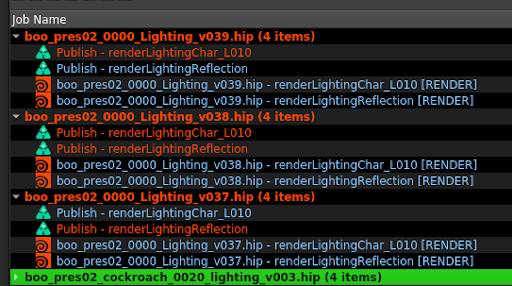
Here’s the screen shot for the mixed publish fails for 3 versions submitted at the same time, this was without the workfile version sync on.

As far as I can tell, this issue has many parts:

  1. Output file paths in Houdini files may override one another from different submitted versions. Check if the output in the ROP nodes is unique for each submitted version.
  2. Version are not locked where v039 can be published as v037 if the publish jobs run at different order. (this is the same issue mentioned in the other post)
  1. I think it’s expected behaviour that artists don’t manipulate the rop outputs at all directly, if they want to submit 3 consecutive versions they should be able to change something and just publish. Yes by default if this is all from the same workfile version, then these exrs could overwrite something, but if auto increment is on for the workfile then these 3 submissions should all result in unique exrs, and by default the workfile version is added to the rop output. I don’t think this itself is tied to the publish version issue, this could only lead to the wrong image being published for the publish job, but I don’t think we’re currently having this issue.

  2. Yes, in this case though we’re not looking for v39 to publish as v37, it’s more that v37 should publish as v37. If v37 were the first one to finish, v36 is the last publish, I think it’s expected that it should publish as 37. If the v39 job finished first then yes it would jump to v39, and then the v37 jobs would fail. What we’re seeing in the screenshot above is a mixture of those two thing, v37 renderLightingChar finishes first for that version stream but publishes as v39 anyway, and v39 renderLightingReflection publishes as v39, and blocks the v37. The latter I can understand with the way Ayon is currently working, but the former did’nt make any sense.

I’ve heard though that up front publishing is on the roadmap, and I think this would solve two issues we have:

  1. It would ensure versions are reserved up front before rendering, so this issue shouldn’t arise as it will then be forcibly created in that version.
  2. We then have the option to directly render into the publish folder and skip the work folder.

I’m not sure time wise how far this is out though but I think that would fix things overall at least if it was the default a studio was using, this issue would remain for people who don’t elect to use it.

We’re trying for now just to render one version at a time to avoid it as well, although we’re still seeing some jobs on the farm failing even then, but this may be something we can handle internally at least.