Update
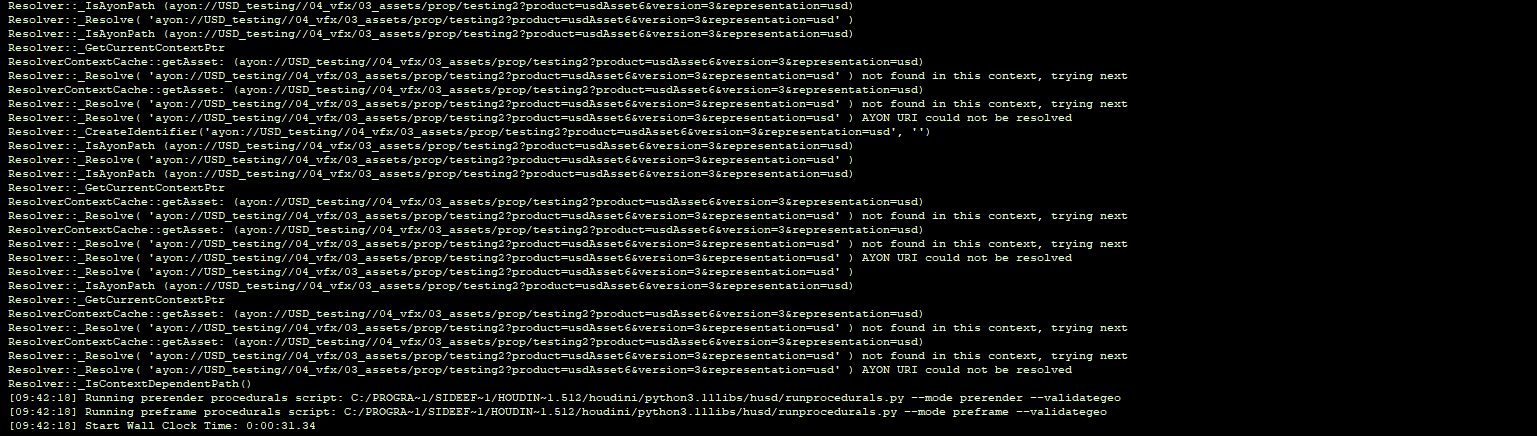
We’re running the farm on Windows. The resolver was failing because the AYON URI string in the pinning file did not match the URI string the USD resolver was trying to resolve on the farm.
What is happening
The pinning file originally stored keys in a Windows-style format:
ayon:\\USD_testing\\04_vfx\\03_assets\\prop\\testing2?product=usdAsset7&version=1&representation=usd
But on the farm the resolver tries to resolve this URL-style:
ayon://USD_testing//04_vfx/03_assets/prop/testing2?product=usdAsset7&version=1&representation=usd
Since the resolver does an exact lookup in the pin data, it couldn’t find the ayon://... key, resulting in “not found in this context” / “AYON URI could not be resolved”.
Example
Old pinning file, generated by AYON:
{
  "ayon_resolver_pinning_data": {
    "y:\\USD_VP_USD_testing\\04_vfx\\03_assets\\prop\\testing2\\work\\mdl\\houdini\\ayon\\renderModelMain\\usd\\USD_testing2_mdl_model_v057\\renderModelMain\\__render__.usd": "y:\\USD_VP_USD_testing\\04_vfx\\03_assets\\prop\\testing2\\work\\mdl\\houdini\\ayon\\renderModelMain\\usd\\USD_testing2_mdl_model_v057\\renderModelMain\\__render__.usd",
    "ayon:\\USD_testing\\04_vfx\\03_assets\\prop\\testing2?product=usdAsset7&version=1&representation=usd": "y:\\USD_VP_USD_testing\\04_vfx\\03_assets\\prop\\testing2\\publish\\mdl\\usd\\usdAsset7\\v001\\USD_testing2_mdl_usdAsset7_v001.usd",
    "y:\\USD_VP_USD_testing\\04_vfx\\03_assets\\prop\\testing2\\publish\\mdl\\usd\\usdAsset7\\v001\\payload.usd": "y:\\USD_VP_USD_testing\\04_vfx\\03_assets\\prop\\testing2\\publish\\mdl\\usd\\usdAsset7\\v001\\payload.usd",
    "ayon:\\USD_testing\\04_vfx\\03_assets\\prop\\testing2?product=usdAsset7_model&version=1&representation=usd": "y:\\USD_VP_USD_testing\\04_vfx\\03_assets\\prop\\testing2\\publish\\mdl\\usd\\usdAsset7_model\\v001\\USD_testing2_mdl_usdAsset7_model_v001.usd",
    "ayon:\\USD_testing\\04_vfx\\03_assets\\prop\\testing2?product=modelVarA&version=14&representation=usd": "y:\\USD_VP_USD_testing\\04_vfx\\03_assets\\prop\\testing2\\publish\\mdl\\model\\modelVarA\\v014\\USD_testing2_mdl_modelVarA_v014.usd",
    "y:\\USD_VP_USD_testing\\04_vfx\\03_assets\\prop\\testing2\\publish\\mdl\\usd\\modelVarA_geo\\v005\\USD_testing2_mdl_modelVarA_geo_v005.usd": "y:\\USD_VP_USD_testing\\04_vfx\\03_assets\\prop\\testing2\\publish\\mdl\\usd\\modelVarA_geo\\v005\\USD_testing2_mdl_modelVarA_geo_v005.usd",
    "y:\\USD_VP_USD_testing\\04_vfx\\03_assets\\prop\\testing2\\publish\\mdl\\usd\\modelVarA_model_VarA\\v005\\USD_testing2_mdl_modelVarA_model_VarA_v005.usd": "y:\\USD_VP_USD_testing\\04_vfx\\03_assets\\prop\\testing2\\publish\\mdl\\usd\\modelVarA_model_VarA\\v005\\USD_testing2_mdl_modelVarA_model_VarA_v005.usd",
    "ayon_pinning_data_entry_scene": "Y:/USD_VP_USD_testing/04_vfx/03_assets/prop/testing2/work/mdl/houdini/ayon/renderModelMain/usd/USD_testing2_mdl_model_v057/renderModelMain\\__render__.usd"
  }
}
Working Pinning file:
I got it working by manually modifying the pinning file to use the ayon://... format (matching what the farm resolver requests):
{
  "ayon_resolver_pinning_data": {
    "y:\\USD_VP_USD_testing\\04_vfx\\03_assets\\prop\\testing2\\work\\mdl\\houdini\\ayon\\renderModelMain\\usd\\USD_testing2_mdl_model_v057\\renderModelMain\\__render__.usd": "y:\\USD_VP_USD_testing\\04_vfx\\03_assets\\prop\\testing2\\work\\mdl\\houdini\\ayon\\renderModelMain\\usd\\USD_testing2_mdl_model_v057\\renderModelMain\\__render__.usd",

    "ayon://USD_testing//04_vfx/03_assets/prop/testing2?product=usdAsset7&version=1&representation=usd": "y:\\USD_VP_USD_testing\\04_vfx\\03_assets\\prop\\testing2\\publish\\mdl\\usd\\usdAsset7\\v001\\USD_testing2_mdl_usdAsset7_v001.usd",

    "y:\\USD_VP_USD_testing\\04_vfx\\03_assets\\prop\\testing2\\publish\\mdl\\usd\\usdAsset7\\v001\\payload.usd": "y:\\USD_VP_USD_testing\\04_vfx\\03_assets\\prop\\testing2\\publish\\mdl\\usd\\usdAsset7\\v001\\payload.usd",

    "ayon://USD_testing//04_vfx/03_assets/prop/testing2?product=usdAsset7_model&version=1&representation=usd": "y:\\USD_VP_USD_testing\\04_vfx\\03_assets\\prop\\testing2\\publish\\mdl\\usd\\usdAsset7_model\\v001\\USD_testing2_mdl_usdAsset7_model_v001.usd",

    "ayon://USD_testing//04_vfx/03_assets/prop/testing2?product=modelVarA&version=14&representation=usd": "y:\\USD_VP_USD_testing\\04_vfx\\03_assets\\prop\\testing2\\publish\\mdl\\model\\modelVarA\\v014\\USD_testing2_mdl_modelVarA_v014.usd",

    "y:\\USD_VP_USD_testing\\04_vfx\\03_assets\\prop\\testing2\\publish\\mdl\\usd\\modelVarA_geo\\v005\\USD_testing2_mdl_modelVarA_geo_v005.usd": "y:\\USD_VP_USD_testing\\04_vfx\\03_assets\\prop\\testing2\\publish\\mdl\\usd\\modelVarA_geo\\v005\\USD_testing2_mdl_modelVarA_geo_v005.usd",
    "y:\\USD_VP_USD_testing\\04_vfx\\03_assets\\prop\\testing2\\publish\\mdl\\usd\\modelVarA_model_VarA\\v005\\USD_testing2_mdl_modelVarA_model_VarA_v005.usd": "y:\\USD_VP_USD_testing\\04_vfx\\03_assets\\prop\\testing2\\publish\\mdl\\usd\\modelVarA_model_VarA\\v005\\USD_testing2_mdl_modelVarA_model_VarA_v005.usd",

    "ayon_pinning_data_entry_scene": "Y:/USD_VP_USD_testing/04_vfx/03_assets/prop/testing2/work/mdl/houdini/ayon/renderModelMain/usd/USD_testing2_mdl_model_v057/renderModelMain/__render__.usd"
  }
}