The version 1.2.0 of ayon-launcher was released today, it breaks our workaround.
Until today, to have Ayon available for several users in a Windows computer, we just had to create a shortcut that targets C:\Program Files\Ynput\AYON x.y.z\ayon.exe
(we install Ayon with the “Install for all users” option, because a lot of artists share the same computer, but not the same day, of course)
But now, we get an Ayon popup which says “Your user does not have required permissions to update AYON launcher”.
I am an administrator of my computer so that’s puzzling. Also, previously it worked for artists that are not administrators.
The other way is to use the shim that was created (but it only exists for the user that installed Ayon launcher) : C:\Users\[MyUserName]\AppData\Local\Ynput\AYON\shim\ayon.exe
This other way also does not work anymore : now a cx_freeze popup says ModuleNotFoundError : No module named 'urllib'
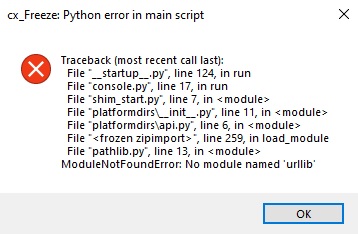
I created a bug report : ayon-launcher fails to start on Windows since version 1.2.0 · Issue #203 · ynput/ayon-launcher · GitHub