Issue with Editorial Simple permissions

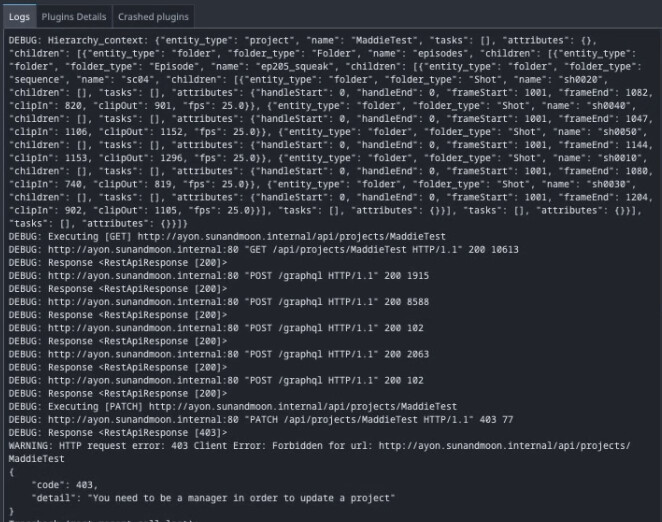
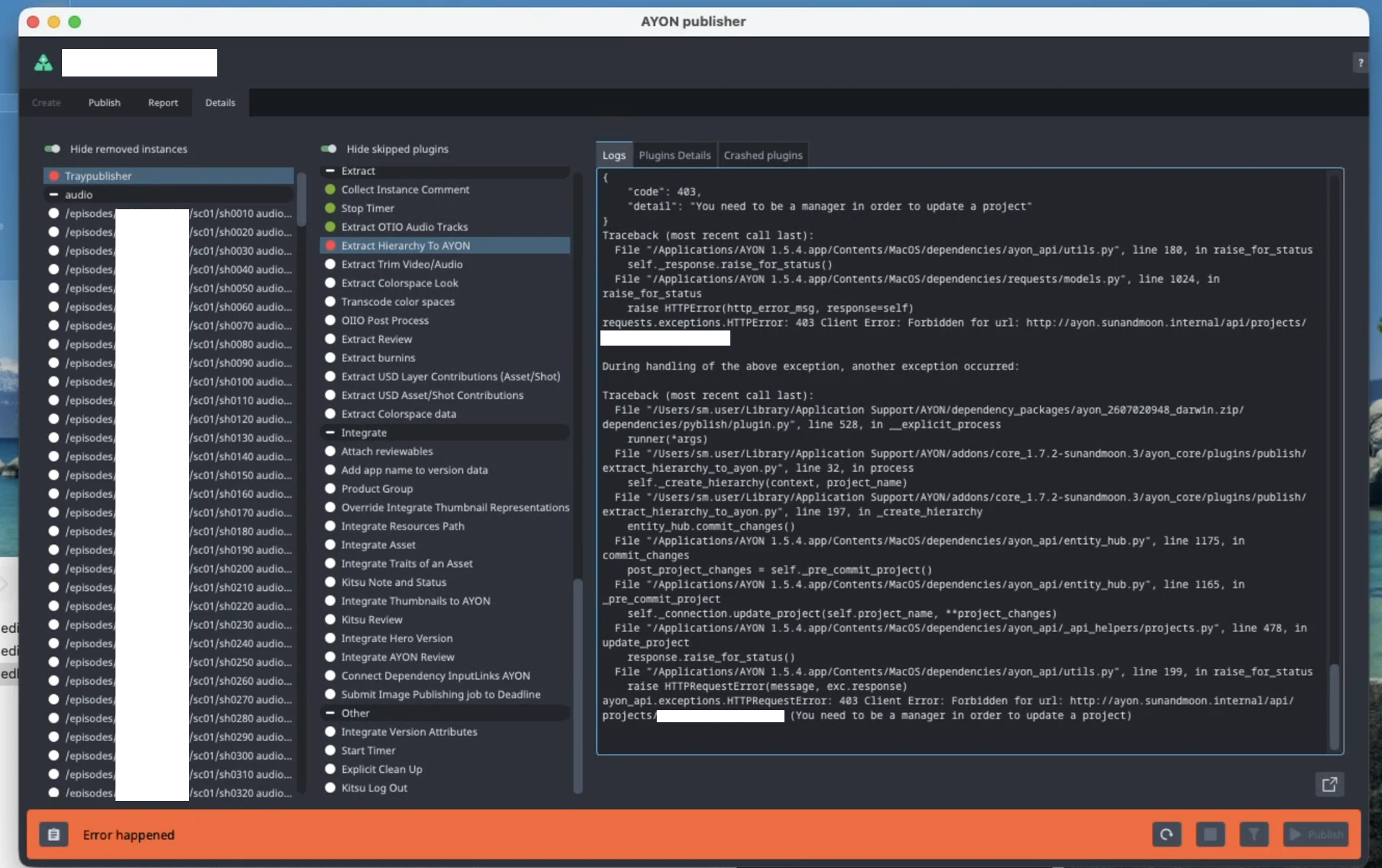
We’ve set up Editorial Simple publishing through the Tray Publisher, and got one of our editors (with the default “artist” permissions for the project) to try a publish. When he does so however it comes up with a 403 client error “You need to be a manager in order to update a project”:

What’s additionally confusing about this is that we’ve got a test user set up on a test project, with the same settings as the main project and (as far as I can see) the same permissions, and was able to publish an Editorial Simple without any issues. Is there something I’m missing here with the permission management?

In users’s page. if the access level is set to user

You’ll meet another layer of permissions project access where you select a default access group for future projects.

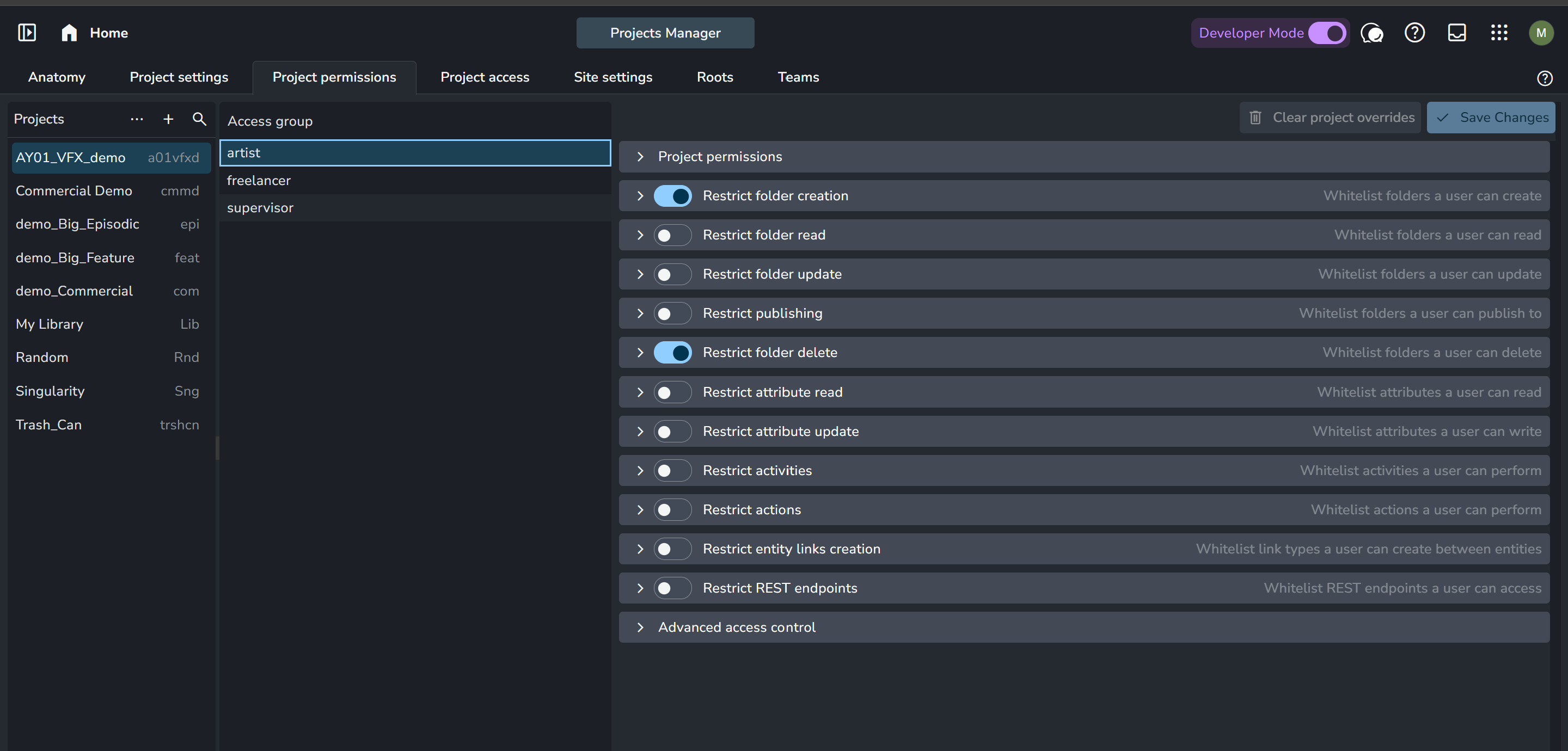
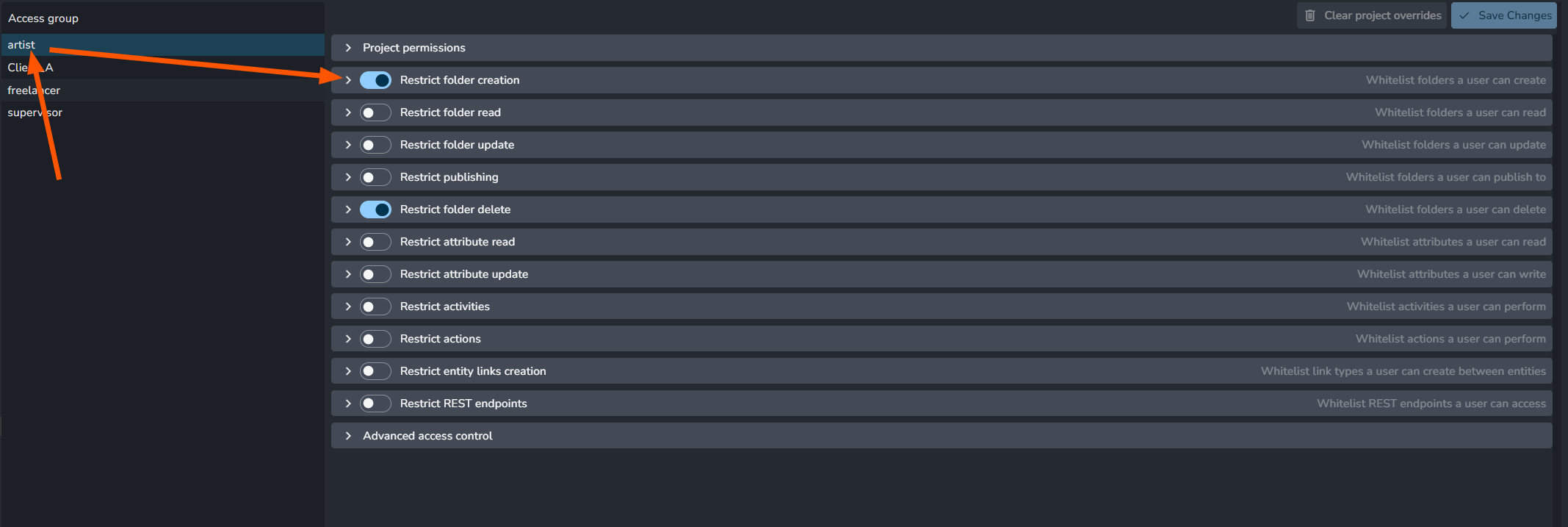
For the default artist access group, users won’t be able to create shots in project hierarchy.


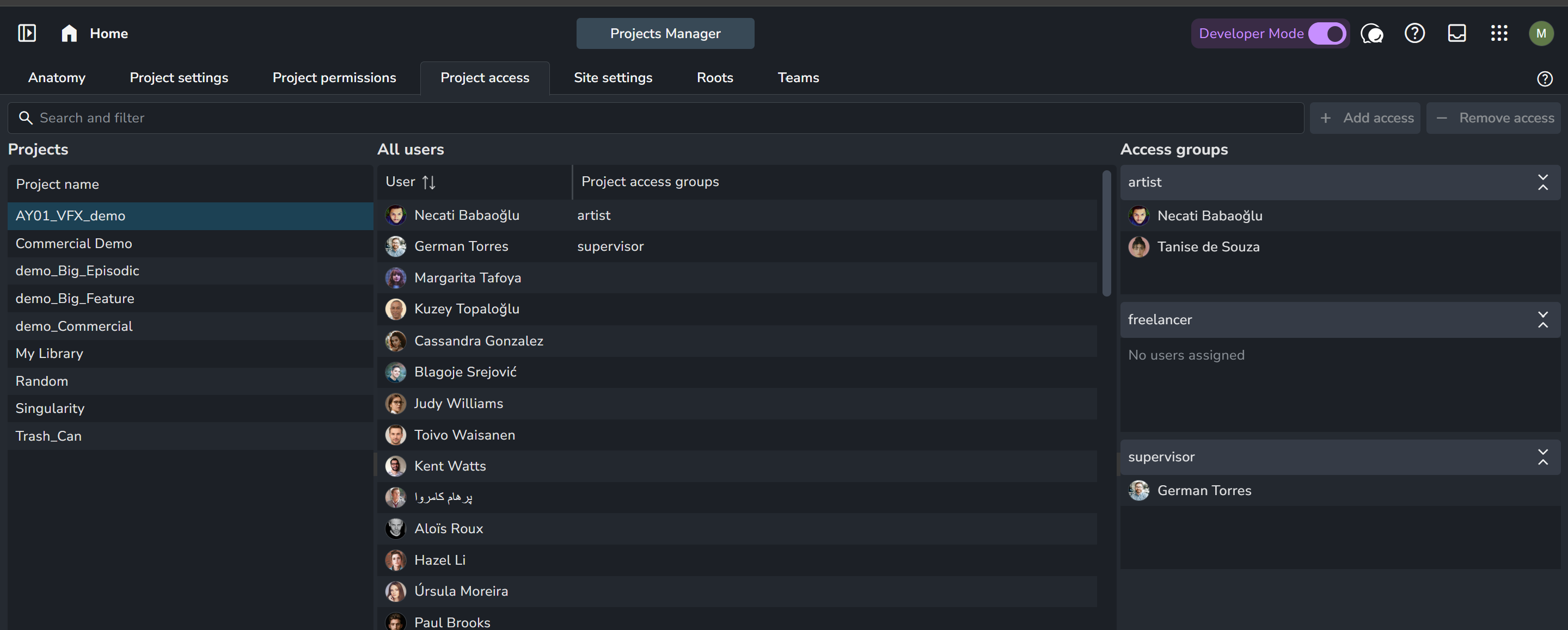
To check which access group is actually assigned to your user. you can see it in the project access.


Could you check permissions again? I think assigning supervisor access group to your artist should fix it.

Apologies for the delay - adding supervisor for the project does appear to have fixed it, thank you!

Out of interest, is there a specific permission under Project Permissions that would work for this, so we could create a new role that assigns that permission without requiring the full Supervisor role?

The thing is creating new folders is restricted in the default Artist role.

You can modify it OR you can create another role with folder creation enabled.

Struggling with this one, we’ve got two editors who both have full supervisor permissions to the project who are now suddenly running into the issue again. We’ve not made any changes to permissions or any of the plugins or settings within AYON, but out of the blue it’s now giving the same “ayon_api.exceptions.HTTPRequestError: 403 Client Error: Forbidden for url: /api/projects/<project_name> (You need to be a manager in order to update a project)” error as before.

I’ve tried setting up custom permissions with “Restrict folder creation” and “Restrict folder update” enabled, but this doesn’t seem to have changed anything. It also doesn’t appear clear if we have to define an Access List, or if leaving the Access List blank means it grants access to everything?

Also, if a user is a member of two permission groups, will it take the highest level permission (i.e. if artist and supervisor are applied, it adds supervisor permissions) or does it go for least privilege?

The setting tip mentions it’s a whitelist. therefore, it’s an explicit access list.

As far as I can remember it merges the permissions. e.g. if something is enabled on artist but not supervisor and another thing is enabled on supervisor but not artist. assigning users to both roles, they will get both things enabled.

Ok, have done some further testing:
I had two projects set up, a test project and our live production. User permissions and tray publisher settings are the same across both projects, and the user is a Supervisor on both projects.

Publishing on the test project completed successfully, but trying to publish to the live project gave the same permissions error. I was able to complete multiple EDL publishes to the test project, but not to the live.

After comparing the two projects for any potential differences, the only thing noted was that the Anatomy > Task types were different. After updating the task types, I now get the same error when publishing to the test project, though after comparing and rolling back the changes it doesn’t seem to make any difference and still fails with a permissions error.

The exact point it fails at appears to be in the _create_hierarchy step of the script, once it tries to call the “commit_changes” function on the EntityHub:

Does the test project had project hierarchy created before publishing?

this is the step where it creates the project hierarchy and tasks.
If you want to test your user permissions, could you try creating folders and tasks using it?

and, the log message here tells: you need to elevate the user role to be manager.
image

Does the test project had project hierarchy created before publishing?

In both cases, the episodes existed but not the scenes or shots being published to. We’re using the Editorial Simple publish to create the shots.

If you want to test your user permissions, could you try creating folders and tasks using it?

I’ve checked, and with the test account they can create folders and tasks under the project when working in AYON in the browser, both with the Supervisor permissions and with our custom Editor permissions.

and, the log message here tells: you need to elevate the user role to be manager.

Am I right in my understanding that “Manager” gives access to all projects? If so, we cannot do this - we have editors hired per-project, and this would allow them to see other projects on AYON that they should not have access to.
Additionally, I’m confused as to why this is necessary - they can create the project hierarchy and tasks with Supervisor permissions, and the Editorial Simple was working with Supervisor permissions until the project anatomy was changed.

Hi, sorry to bump this thread again. Genuinely very confused about this one, because we’ve now got two projects set up identically - same settings, same anatomy, same permissions, identical - and with the Supervisor (not Manager) permissions set it’s working on our test project and not the live again.

I’ve looked into the Logs, and it’s always failing on the Extract Hierarchy to AYON step. The only difference I’ve noticed is on the test project, it tries to patch to:

2026/09/30 11:21:25 DEBUG: Executing [POST] http://ayon.sunandmoon.internal/api/projects/test_project/operations/background
2026/09/30 11:21:25 DEBUG: http://ayon.sunandmoon.internal:80 “POST /api/projects/test_project/operations/background HTTP/1.1” 200 74

While on the live project it’s trying to patch the root project and failing:

2026/09/30 11:18:59 DEBUG: Executing [PATCH] http://ayon.sunandmoon.internal/api/projects/live_project
2026/09/30 11:18:59 DEBUG: http://ayon.sunandmoon.internal:80 “PATCH /api/projects/live_project HTTP/1.1” 403 77

So this would suggest some difference between the project settings, I’m just struggling to identiy what would cause this difference.

EDIT: I’ve confirmed the only difference between the projects is the Anatomy, as the live project has some additional task statuses. I also modified the entity_hub.py script to output the project changes prior to calling the *self._connection.update_project(self.project_name, *project_changes) line that it’s currently failing on, and confirmed that for the test project it has no changes and for the live project it returns “statuses”. Presumably it’s trying (and failing) to update these for some reason?

EDIT 2 (resolution?): I copied the Statuses from the project anatomy, did a publish as an admin, then copied the Statuses again. The only change I can see is that it’s changed the colour hexadecimals from uppercase to lowercase, and yet now when I publish to the live project as a Supervisor, it works. It feels odd that the issue might’ve been the formatting of the Status colours, but that seems to be the case?

EDIT 3: Sort of resolved. After a few more publishes it seems to still want to update Statuses sometimes, though I can’t see any difference between the before and after when I publish as Admin. Presumably it’s updating something in the background, or something’s causing the statuses to reset. Either way, if the error occurs, we re-publish as Admin and it starts working again.

Good morning @beevdb this is quite complex debugging and we would like to thank you for this. This is very difficult to understand the case without full spectrum of publishing data. Ideally if we want to move forward we would need your help and send us both publishing reports from publisher for both project publishing sessions where it fails. And it would be also good to get json dump of your anatomy for each project - there is Copy Anatomy at top left.

I do realize you might be working with sensitive data, but we should only be able to see your anatomy and structure, perhaps project name and file names.

Without proper Support contract with signed NDA it would be very difficult for us to debug and fix it for you. Only way to solve it is by you being able to share with us more details.

Thank you and have a great day!

J.