I am trying to create an addon to get to know when the artist open a dcc.
i have created a addon package with the addon file like this
class CustomAddon(AYONAddon, IPluginPaths):
    name = "ayon_addon"
    title = "Ayon Addon"
    version = __version__
    # host_name = "maya"

    def get_launch_hook_paths(self, app):
        print(app.host_name)
        return [
            os.path.join(ROOT_DIR, "hooks")
        ]
and in the hooks folder i have a python file
class LogTaskLaunch(PostLaunchHook):
    # Run for both local and Maya launches
    launch_types = {LaunchTypes.local, LaunchTypes.maya}

    def execute(self):
        # Print to stdout and also log to a file for debugging
        print("\n LogTaskLaunch hook executed!")
but it doesnt seem to load the addon, can someone help as how to go about this ?
Could you check if your code follows the addon structure and your package.py file is set properly ?
Addon structure is outlined here and here’s a working example addon that you can tweak it GitHub - ynput/example-studio-addon · GitHub.
LaunchTypes.maya is not a thing, that’s probably why the file is not loaded. To filter by host use hosts = {"maya"} instead.
Few side notes:
- You don’t need to inherit from
IPluginPaths if you implement only get_launch_hook_paths.
- Don’t use
ayon_addon  for custom addon.
- It is not
Ayon but AYON.
Yes i understand, i was just trying out and kept these names, so now it picks up the addon, but it doesnt seem to load the hooks, i have the hooks folder under client/tracker/hooks/task.py
import os
from ayon_core.lib.applications import PostLaunchHook
from ayon_core.lib.applications import AppHook
from ayon_applications import PreLaunchHook, LaunchTypes


print("\n!!! AYON IS ATTEMPTING TO LOAD THE HOOK !!!\n")


class LogTaskLaunch(PostLaunchHook):
    launch_types = {LaunchTypes.local}

    def execute(self):
        print("\n[TRACKER] LogTaskLaunch hook executed!")
but none of the print seems to happen , do i need to use log or something else to see if its picked up this code?
class CustomTrackerAddon(AYONAddon, IPluginPaths):
    name = "custom_tracker"
    title = "Custom Tracker"
    version = __version__
    # host_name = "maya"

    def get_launch_hook_paths(self, app):
        print(app.host_name)
        print(os.path.join(ROOT_DIR, "hooks"))
        return [
            os.path.join(ROOT_DIR, "hooks")
        ]
this is what i have on the addon
when i launch ayon in dev in the console it seems to print all the print above this class , but its not printing anything inside of get_launch_hook_paths, even when i launch maya. can someone suggest as to what i am missing?
seems all this is working and it just doesnt print anything,  , the print or self.log doesnt work.
how do you check it?
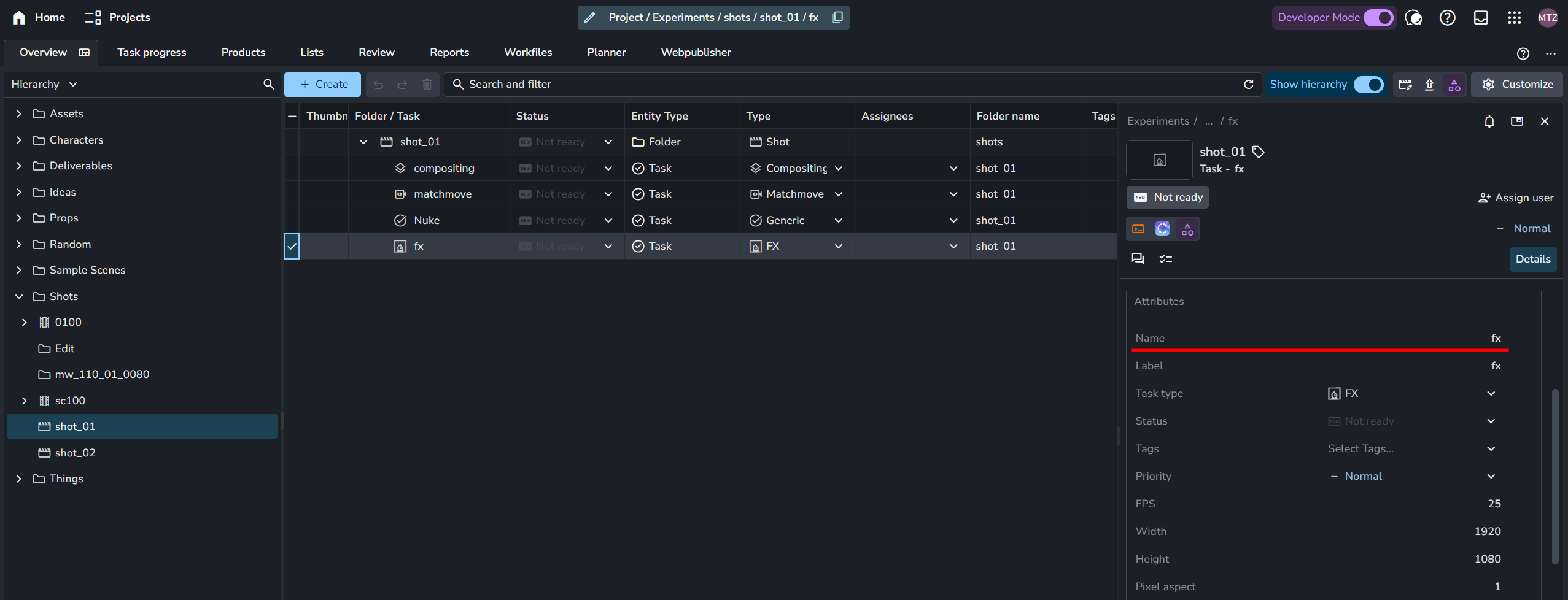
To see the hook log, you need to launch applications from terminal.
cd <ayon-launcher-installation-location>
./ayon_console.exe addon applications launch --app houdini/20-5 --project Experiments --folder /shots/shot_01 --task fx
i just use the ayon_console.exe --use-dev and then launch by default,
i tried like this
.\ayon_console.exe --use-dev addon applications launch --app maya/2024 --project SYNC_TEST --folder /Asset/ball --task model
but i get
Traceback (most recent call last):
  File "C:\Users\pavithraj\AppData\Local\Ynput\AYON\addons\applications_1.3.3\ayon_applications\addon.py", line 282, in launch_application
    app_manager.launch(app_name, **data)
  File "C:\Users\pavithraj\AppData\Local\Ynput\AYON\addons\applications_1.3.3\ayon_applications\manager.py", line 193, in launch
    return self.launch_with_context(context)
  File "C:\Users\pavithraj\AppData\Local\Ynput\AYON\addons\applications_1.3.3\ayon_applications\manager.py", line 169, in launch_with_context
    return launch_context.launch()
  File "C:\Users\pavithraj\AppData\Local\Ynput\AYON\addons\applications_1.3.3\ayon_applications\manager.py", line 707, in launch
    self.run_prelaunch_hooks()
  File "C:\Users\pavithraj\AppData\Local\Ynput\AYON\addons\applications_1.3.3\ayon_applications\manager.py", line 690, in run_prelaunch_hooks
    hook.execute()
  File "C:\Users\pavithraj\AppData\Local\Ynput\AYON\addons\maya_0.5.1\ayon_maya\hooks\pre_open_workfile_post_initialization.py", line 17, in execute
    maya_settings = self.data[ "project_settings"]["maya" ]
KeyERROR: 'project_settings'
@mustafa_jafar do you have any suggestions as what to do for this ?
I had to give
.\ayon_console.exe --use-dev addon applications launch --app maya/2024 --project TECH --folder /Asset/ball --task modeling
seems its looking for the task type and not the task name.
By default the task type is used for name and label.
And the task name is the one you see in here.
Note the UI of desktop tools (e.g. launcher UI) show labels not names.