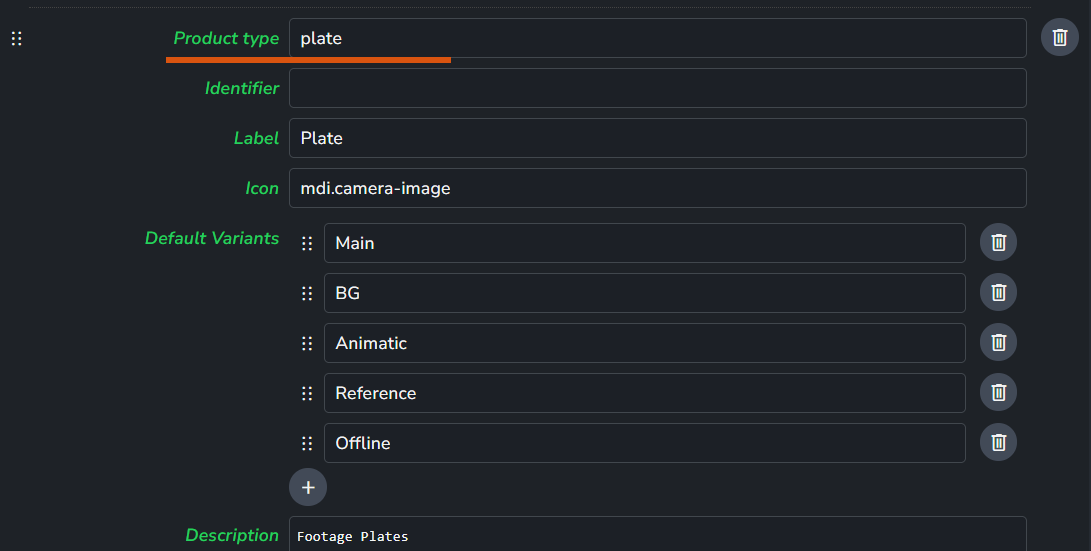
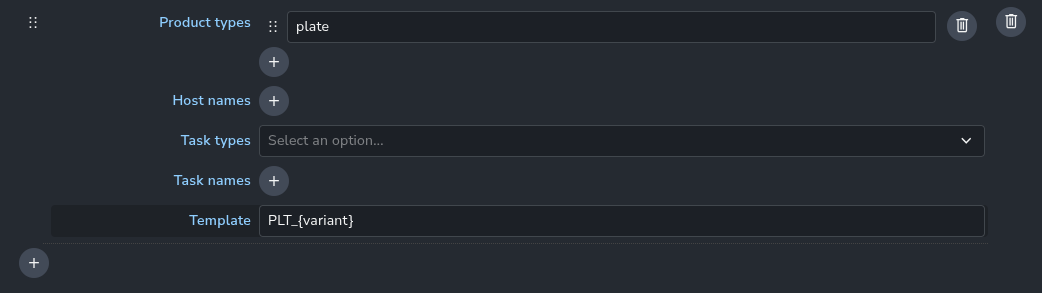
I’ve configured the tray publisher to use PLT as opposed to plate for the product type and then used the tray publisher to publish some EXRs as a plate.
Two questions:
I can see this plate in the loader in Nuke, but in the right-click menu there isn’t “load clip”. What’s the difference between that product and a render product I created via nuke using create + publish? (which does have “load clip” in the menu in the loader)
the tray publisher seems to just copy the EXRs to the appropriate path and create a version of a product with just one representation: exr. Can it not generate other representations, e.g. an h264 for review etc.? I’m thinking what I might ultimately do is not use the tray publisher for these plates, rather write some code to publish these plates and generate representations they way I need. (extra info btw, I’m going to need to generate the EXRs in Nuke from .MXF files)
Let me answer your questions. (going to rephrase them a bit)
I can’t Load Plate Created by Tray Publisher as Nuke Read Node
This is because loaders expect the product type to be plate not PLT.
What’s the difference between that product and a render product I created via nuke using create + publish?
The difference is only about how they are labeled in the system. one got the product type plate and the other got PLT.
the tray publisher seems to just copy the EXRs to the appropriate path and create a version of a product with just one representation: exr .
Not only that but also it can name the files and registers the files in the DB.
Can it not generate other representations, e.g. an h264 for review etc.? I’m thinking what I might ultimately do is not use the tray publisher for these plates, rather write some code to publish these plates and generate representations they way I need.
There’s extract review plugin which can generate h264 review from your exrs. ensure you have traypublisher in hosts list.
extra info btw, I’m going to need to generate the EXRs in Nuke from .MXF files
Feel free to write feature requests on our Feedback Portal
This solution is for the product name. I think this solution is cool. changing the name template is a good place to replace the product type with a different name. but you may need to make a big list of all the products you want to change.
yes it is in progress and not releases yet.
loader plugins include hardcoded list of product types that it can load. e.g. image loader in Nuke