We tried to use the custom tools of the ayon-maya’s addon in our studio, and I had troubles with getting the filesystem path of the current ayon folder (basically the folder path in filesystem of an asset in my case). I did not find anything in the api to get any ayon folder’s filesystem path based on it’s name or context for example (but maybe I missed it?). I managed to rebuild the path with the root path of the project and the folder relative path, but it’s like 30 lines of code and I feel it’s not really sound, and very heavy for just getting a filepath . So what would be the simplest way of getting the filesystem path of the ayon’s folder of the current opened scene? (the folder path and not the scene’s path). And I would extend the question to any folder, like we know the name of the folder (or it’s relative path), how to get it’s file system path.
I’m sorry but what about using maya commands to get the file path and then get the directory from it?
I’m not sure if it’ll work with freshly opend maya scene without saving it via workfile tool.
Also, I think this is what you were trying to achieve in your code: (I’m not sure if there’s a shorter way)
In my case I need the filepath of the asset, so it’s not the workdir if I’m not mistaken (in our workflow, workdir corresponds to the task).
I could do it with maya cmds, but the asset folder is a few folders above, and it would assume the hierarchy is the same in our workflow between assets, shots, sets etc… which I’m really not sure. Also it feels more sound to ask the asset manager for the filesystem pathes cause it’s part of it’s responsibilities.
Here is a visual example with the path of a scene: M:\ayon_projects\QUIC\ASSETS\CHARS\quickos\work\lookdev\QUI_quickos_lookdev_v015.ma
Here QUIC is the project’s root quickos is the asset lookdev is the task (and the workdir).
So for the asset’s folder, the filesystem path, and what I need to retrieve from ayon’s api is this: M:\ayon_projects\QUIC\ASSETS\CHARS\quickos
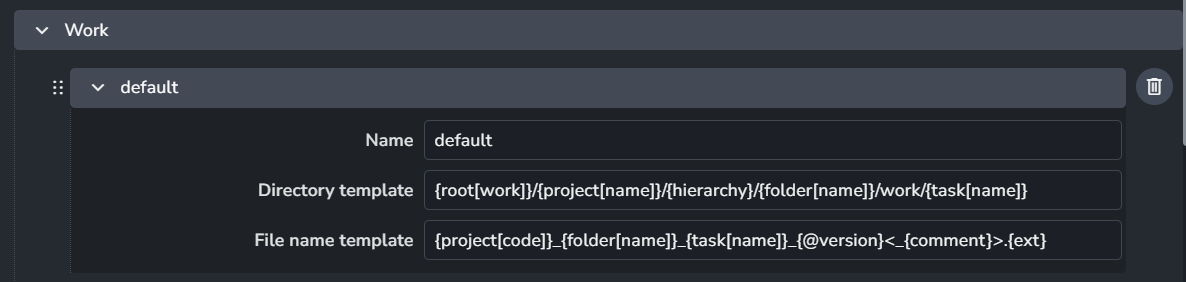
workfiles are saved to the work directory following work template in your anatomy setting. and this directory is know to the AYON pipeline and you can get it for your current context using get_workdir function as shown above.
Asset or shots directories are not something that has a defintion in the settings, we just refer to them as hierarchy/folder_name or folder_path within your work template.
If you are using the default work template (which is the case for almost all of the applications except Unreal), you can always strip the template and resolve the part you are interested in. e,g,.
Okay thanks for the alternative.
I feel It’s still a heavy procedure just for getting the file path of a specific ayon’s folder as it’s as long as what I did previously.
Is there a reason why this part is not handled by the api to simplify this process? or is it planned in the future?
Sorry, I couldn’t get it. could you elaborate about your expectations?
I’m not sure if this helps but let me expand a bit on this.
Anatomy templates are the middle point where the file locations are linked to a specific context in AYON.
e.g. For an AYON context (application, task name, folder path, project name) use a particular anatomy preset.
that’s why in my code snippet above, I quired the current AYON context (host_name, project_entity, folder_entity and, task_entity). Then, I quired the current work directory for my context.
I’m not sure if describing it as a “heavy procedure” is accurate. I’d rather say it comprehensive configurations.
In the case of getting the workdir yes I think this is a good approach, and not heavy at all. But in my case I need the filepath of an asset (or any ayon’s folder) so it’s not the workdir, and that’s where I find it heavy if I have to retrieve templates, strip the part I’m interested in and fill the gaps.
I would expect a function in the same style of the get_workdir, but that would be generic to all ayon’s folders.
For example:
The tricky thing here is that technically there is no on disk folder path… There’s no such thing.
You have work areas, and publish destinations. They can be in an arbitrary location, even on different disks.
The publish folders can technically even have product type before the folder name… as such, is there a reasonable way then to get a folder path without a product? Same for workfiles, depending on task type the folder can be on a completely different disk (e.g. putting FX tasks on a different server because it needs heavy caches to be loaded rapidly, etc.) These anatomy paths are highly customizable making just ‘the folder itself’ not enough context to define where something may live or not.
All these things make it so that work area context and publish contexts have a path, but the folder itself - not really.
Is there a middle ground there? Sure. Check out the “Explore here” action in the Launcher. Which essentially does that - explore to the longest form of the anatomy path for which we know the context… then explore up to that folder. Does that mean that this folder is the `folder entity’s actually directory on disk? Not really, but depending on your anatomy templates and usage, you may be able to rely on it though.
In the Explore Here action we essentially get the default workfile template and go to the path to which extend we have the relevant context variables
On my side in work templates, I’ve default and unreal templates.
Both of them include many template keys (variables) and they need the AYON context you are working on to compute the location. e.g.,
default template won’t be computed without the task. So, saying that you want the folder path location on disk is not accurate. Or maybe you are referring to the parent folder of your work area as the folder path location.
unreal since in our Unreal workflow, we suggest having one unreal project per AYON project, this template path doesn’t include any folder path key (variable). So, the folder path location on disk that you are describing doesn’t actually exist!
Thanks for the explanation, there is a lot I was not aware of .
I guess adding a custom key to the Anatomy would work in my case. The problem we have is that it has to be changed manually to each project’s anatomy, and also to future projects (If I understood right), and since project creation and project settings is not the dev’s responsability in our studio, all projects might not have the required custom keys in the Anatomy for our tools to work. But maybe there is a simple way to change the default anatomy for all current/future projects?
To be honest I’m still a bit confused about the folders not having a disk folder path that we can retrieve. I think I get the fact that a user can decide to work on a different disk, but can’t we resolve the path anyway since we can have the root path of the project and the relative path of a folder?
Where current_project_path returns M:\ayon_projects\QUIC and current_folder_path returns \ASSETS\CHARS\quickos.
So by combining the two I get the file system path of the folder M:\ayon_projects\QUIC\ASSETS\CHARS\quickos, which is the correct path in my case. But there are cases where this would not work?
You can update your anatomy preset in studio settings for future projects.
Note, project anatomy is not synced with the anatomy preset it was created from.
As you can see it matches your expectation above project_path/folder_path → {root[work]}/{project[name]}/{folder[path]}
but this only works because we referenced the folder[path] in the work area configuration as folder path is unique in your AYON project.
Let’s consider a hypothetical example (the following keys may not be implemented),
Assume you work in a studio where storage location don’t need to make sense for artists and you configured the work area as follows:
{root[work]}/{project[code]}/{task[id]}
Could you tell me in this example where is the system path for the parent AYON folder of the task?
I tried with those keys but as you said these are not implemented so I could not try what result gives my code, and I don’t know how we can implent those ourselves.
I guess what you’re saying is that, in the case the directory template would not contain the {hierarchy}/{folder[name]} or {folder[path]} keys, trying to get a folder filesystem, and expect it to exist would not make sense, and I think you’re right, but I don’t see a reason why a dev would want to get the filesystem path of a folder in the first place in this scenario, since they changed the default template, to precisely not have folders represented in the file system.
But for the test, I tried removing all keys related to folders in the anatomy template of a project.
My directory template looks like this :{root[work]}/{project[name]}/work/{task[name]}
So the work directory of a scene in the file system looks like this: M:\ayon_projects\TESTFAB\work\lookdev where TESTFAB is the project’s name, but there is concretly no folder path.
In this case when I run my code, i still get the same path as when I had the default template: M:\ayon_projects\TESTFAB/ASSETS/PROPS/simonk_egg where simonk_egg is the folder where the task is contained, but this path technically does not exist in the filesystem with this template.
So I guess what my function does is getting the default location of the asset of the current context. Would you see an issue to add a function to ayon’s api, for example def get_default_folder_location_from_context(context) that does exactly this?
Maybe you will tell me otherwise, but I don’t see a scenario where this would cause a probleme. Even for projects that does not use folder keys in there template, I think this could be of use anyway to get the theorical file system path of there assets if they want to create the hierarchy themselves for example.
I’m just trying to clarify the miss conception about the system path for an AYON folder.
The misconception arises from how a Work Area is often defined versus what an AYON Folder fundamentally is:
Work Area: This is a defined location on disk, derived from an Anatomy Template, which is typically configured for a Task (as tasks are the fundamental units of work).
AYON Folder: This is a purely hierarchical entity within the database. And, it is not assigned a disk path.
The default templates often include keys like {hierarchy}/{folder[name]} or {folder[path]}. When studios use these default keys, they create a predictable folder path. However, since the templates are fully customizable, there is no guarantee that a template will include these path-defining keys.
Therefore, attempting to use a utility like def get_default_folder_location_from_context(context) to retrieve a standard folder path may not work if the default anatomy template has been altered to exclude folder path keys.
Note that it’s completely acceptable to write some custom code to retrieve the paths you need. However, I’d suggest mentioning explicitly that this code works only in a defined manner/scenario.
 . So what would be the simplest way of getting the filesystem path of the ayon’s folder of the current opened scene? (the folder path and not the scene’s path). And I would extend the question to any folder, like we know the name of the folder (or it’s relative path), how to get it’s file system path.