Hello,
I’ve been attempting to write a new host for something experimental,
but I’ve been struggling to get the application side of things to work.
The host I’m working on doesn’t really have any “executable” to speak of, I just want to subprocess python with an AYON context ideally and use websockets to communicate (pretty similar to existing Adobe host addons).
I can’t seem to get my application to show up in the application tray in Launcher, without making an entry in the ayon_applications plugin settings (at which point a clickable entry becomes available but it is not associated with anything).
I have poked at this a couple ways:
I have launched ayon_console with
ayon_console --use-dev addon applications launch --app myapp --project testproject --folder testfolder --task modelling
A window pops up saying Application "myapp" was not found.
I’ve also done ayon_console --use-dev interactive
to then basically go and manually check what’s in the list.
import ayon_applications as app
am = app.ApplicationManager()
print(*am.applications.keys(), sep="\n") # applications
print(*am.app_groups.keys(), sep="\n") # app groups
I’ve implemented the core DCC functions and classes that are expected and I can instantiate them from any ayon python context without any reports on missing implementations or any exceptions otherwise, mainly following:
https://docs.ayon.dev/docs/dev_host_implementation/
I noticed that all other DCCs have hardcoded entries in ayon_applications.
Can someone explain to me how I can associate my host addon with a host that will show up in the Launcher?
Thanks in advance,
Sas
EDIT:
My problem was with the site settings. I had the plugin set up right,
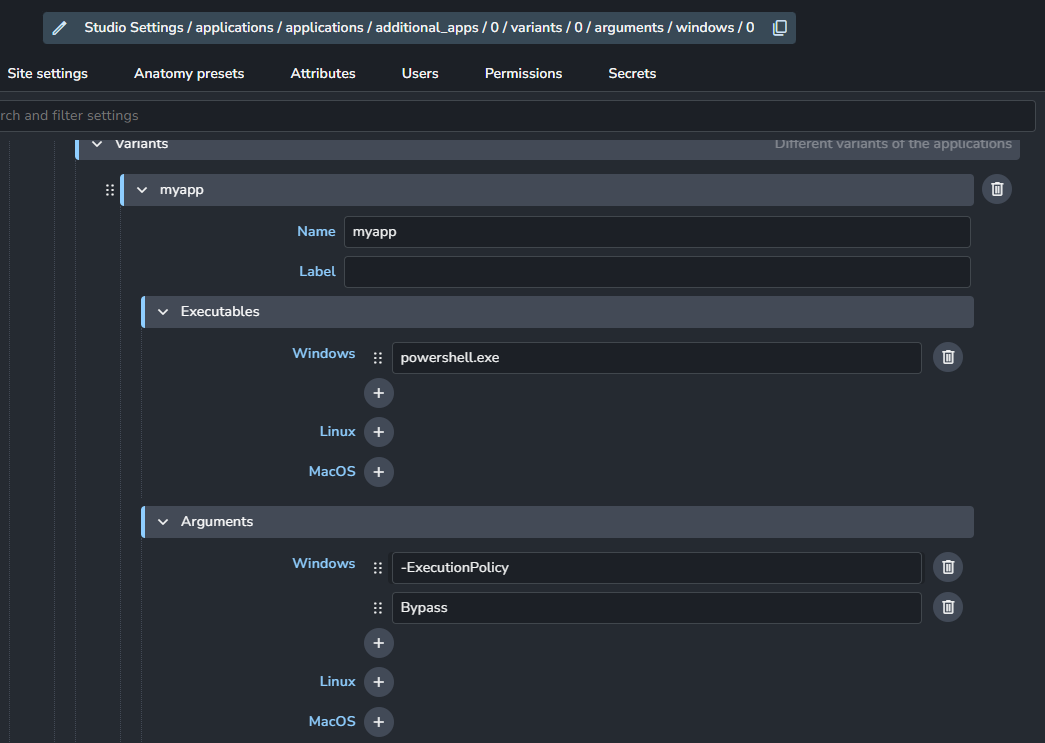
but I had to set a proper variant with a valid executable,
and make sure that in the additional application settings that the name and host name were set in congruence with the addon definition.
client/ayon_myapp/addon.py
class MyAppAddon(AyonAddon, IHostAddon):

    name = "myapp"
    host_name = "myapp"
    version = __version__ # from .version import __version__

    ...

    def get_launch_hook_paths(self, app: IHostAddon) -> list[str]:
        """Returns paths to launch hooks."""
        if app.host_name != self.host_name:
            return []
        return [str(Path(__file__).parent / "hooks")] # from pathlib import Path
SITE: Studio Settings | Bundle | Applications | Additional Applications
Name: myapp
Label: My App
Host name: myapp
...
Variants:
  - Launch MyApp # Note: This name reflects the Label
     - Name: MyApp
     - Label: Launch MyApp
     - Executables:
        - Windows: powershell.exe
        - Linux: sh
        - MacOS: zsh
From there on out I could log the launch context from a pre-launch hook, and understand what is going on.
Most importantly, I wanted to know what’s going on in ayon_applications.LaunchHook (also the base class for PreLaunchHook)
in particular, the launch_context from ayon_applications.manager.ApplicationLaunchContext
LaunchHook.launch_context.launch_args: The current executable that is being launched stored as the first argument in a list. From my experimenting there is no way to provide arguments here, e.g. no powershell.exe -ExecutionPolicy Bypass.
LaunchHook.launch_context.kwargs: keyword args dict for launch context with 2 items by default, with the most important one being creationflags, to be filled in with subprocess.CREATE_ ... type flags. The env is also stored in here as a keyword arg.
LaunchHook.launch_context.env: an alias for LaunchHook.launch_context.kwargs['env'] meaning that modifying this modifies the kwargs in place.
The LaunchHook also has a logger, in LaunchHook.log.
Sorry for the infodump, just documenting for documentings’ sake as none of this is really intuitive at all and I think that any shred of information would help.
Thanks for your patience,
Sas